Features
Monthly fees and debts
The monthly fee works itself out from the course price and the lesson days, and every payment reduces the debt at once.
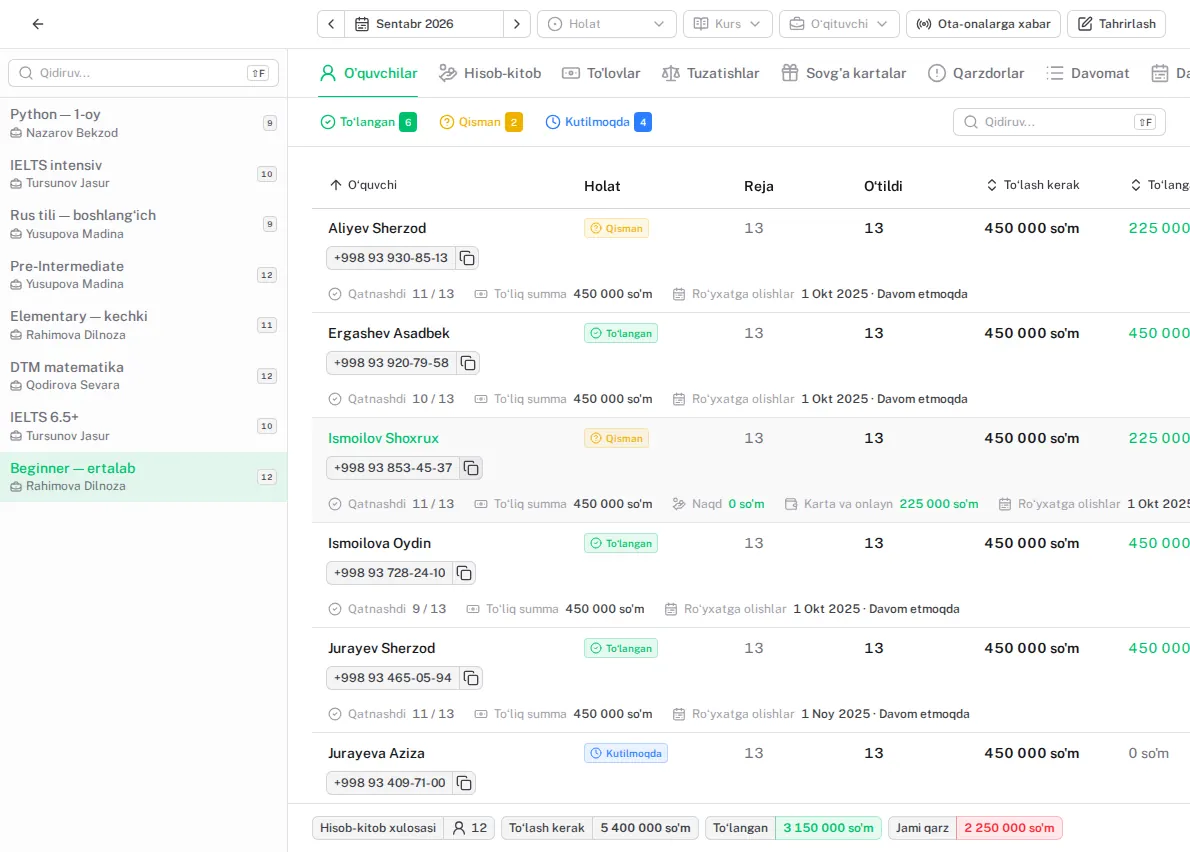
Sound familiar?
- The Excel formulas break and nobody knows who owes what
- Discounts and part payments get mixed up
- Debtors show up at the end of the month — too late
How it works in Lecxe
- 1
Bill the month
At the start of the month one button bills every active student — and tells you whom it skipped and why.
- 2
Take the payment
Student, month, amount, cash or card. The debt goes down at once.
- 3
Discounts and gift cards
A discount as a percentage or an amount; a gift card pays towards the fee.
- 4
The debtors list
Who, how much and for how many days — and when the month closes, every unpaid bill gets its reason.
Questions
If a lesson is cancelled, does the bill change?
Yes: mark «Lesson not given» and the group’s monthly bill is recalculated. A student missing a lesson does not change the bill.
Can I refund an overpayment?
Yes, with «Refund»: only money actually overpaid, with a date and a reason.
What happens to the balance when a student changes group?
It is kept: the debt or credit moves to the new group.
Works together with
-
Cash desk
Every shift opens and closes with a banknote count.
-
Online payments and receipts Premium
Parents pay with Payme, Click or Uzum, and the receipt issues itself.
-
Reports
Profit and loss, month closing and growth on one screen.
Try it yourself
Your centre is ready in two minutes. Free, with no end date and no card.